
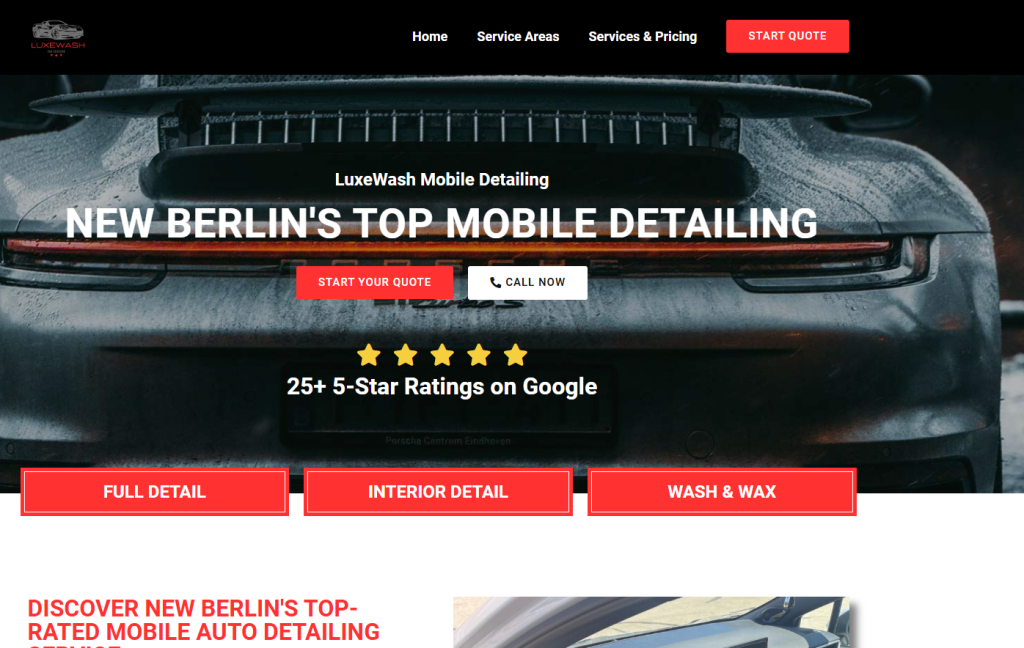
Back in the ’90s, car detailing businesses survived on word-of-mouth and flyers. Fast-forward to today, and a website is the lifeline of your auto detailing business. I’ve seen shops that struggled for years suddenly thrive after going online with a well-designed website.
A website isn’t just a digital business card. It’s a platform to showcase your services, attract local clients, provide online booking, and build trust. If you’ve ever wondered, “how do I make a car detailing website?”, this guide is for you.
As someone who’s spent over three decades detailing cars—from classic muscle cars to modern EVs—I know the pain points of car owners. Dirty interiors, stubborn stains, scratched exteriors… your website should reflect how you solve these problems with skill, efficiency, and trust.
Step 1: Planning Your Car Detailing Website
Before opening any detailing shop, you plan your services. The same principle applies online.
Key Questions to Ask:
- What services do you offer? (e.g., full-service detailing, ceramic coating, interior cleaning)
- Who is your target audience? (local car owners, fleet services, luxury car owners)
- What do you want your website to achieve? (bookings, inquiries, showcase work)
Insider Tip: Start with a simple sitemap: Home, About, Services, Gallery, Blog, Contact. This structure keeps your site organized and easy to navigate.
Step 2: Choosing the Right Platform
In my early years, websites were HTML pages that looked like a bulletin board. Today, platforms like WordPress and Wix allow even non-tech-savvy detailers to create professional sites.
Options:
- WordPress: Highly flexible, thousands of plugins, ideal for blogs and service pages.
- Wix / Squarespace: Drag-and-drop simplicity, good for beginners, less flexibility.
- Custom Development: Best for unique branding, but more expensive.
Veteran Advice: I’ve built websites for detailing shops that doubled bookings within months. WordPress with a professional theme like Elementor is often the sweet spot between cost, design, and functionality.
Step 3: Designing for Your Audience
Your website design should immediately convey professionalism, cleanliness, and trustworthiness. Think of it like detailing a car—the first impression matters.
Design Tips:
- Bold Hero Section: Show a before-and-after photo of a car you detailed.
- Service Highlights: Use icons or images for quick understanding.
- Trust Elements: Reviews, testimonials, and certifications.
- Clear CTAs: “Book Now” or “Request a Quote” buttons.
Pro Tip: Use high-quality images of cars you’ve detailed. Nothing sells better than real results.
Step 4: Essential Pages for a Car Detailing Website
- Home Page: Strong hero section, quick overview of services, and CTAs.
- About Page: Share your story—clients love knowing who’s behind the shop. Mention experience like mine: “30+ years detailing cars from classic Mustangs to modern EVs.”
- Services Page: Break down detailing options with short overviews. Example:
- Exterior Wash & Wax
- Interior Deep Cleaning
- Ceramic Coating & Paint Protection
- Gallery: Before-and-after photos, videos, or timelapse of detailing.
- Blog: Share tips, how-to guides, and industry insights.
- Contact / Booking: Include online forms, Google Maps, phone number.
Step 5: Integrating Online Booking and Contact Options
Back in my first shop, customers had to call to book appointments. Today, online booking is expected.
Options:
- Booking Plugins: WordPress plugins like Bookly or Amelia.
- Simple Forms: Google Forms or contact forms if you prefer simplicity.
- Chat Support: Messenger or WhatsApp widgets for immediate inquiries.
Insider Hack: Allow clients to select services and preferred dates. It reduces back-and-forth calls and speeds up scheduling.
Step 6: SEO for Your Car Detailing Website
A beautiful website is useless if no one finds it. Search engine optimization (SEO) ensures local car owners see your business online.
SEO Tips:
- Keywords: “Car detailing near me,” “auto detailing services [city],” “ceramic coating [city].”
- On-Page SEO: Use service names in headers and meta descriptions.
- Local SEO: Create a Google Business Profile, embed maps, and include local address.
- Blog Content: Write articles like “5 DIY Car Cleaning Tips” or “How to Maintain Your Leather Seats.”
Pro Insight: I’ve helped shops rank on page 1 in their city within 3 months by combining local SEO and blog content.
Step 7: Mobile Optimization
Most clients search for services on their phones. A responsive, fast-loading site is non-negotiable.
- Avoid heavy images that slow loading.
- Use sticky CTAs for booking or calling.
- Test your site on multiple devices.
Story: A client lost 40% of potential bookings because their site wasn’t mobile-friendly. Fixing this increased their revenue within weeks.
Step 8: Showcasing Your Work
Your detailing results are your best advertisement.
- Include a before-and-after gallery.
- Highlight premium services like paint correction or ceramic coating.
- Include video clips showing your process—it adds authenticity.
Insider Advice: Clients often judge the quality by your photos before even reading the service details. Professional photos = professional perception.
Step 9: Adding Trust and Reviews
Reviews are the modern word-of-mouth. Include:
- Google reviews
- Customer testimonials
- Certifications (like detailing courses or brand certifications)
Tip: Short quotes with client name and city feel more genuine than generic text.
Step 10: Maintaining Your Website
A website isn’t a one-time project—it’s a living tool.
- Update plugins and themes regularly.
- Add new projects to the gallery.
- Post blogs 1–2 times per month for SEO and engagement.
- Track analytics to see which pages drive leads.
Pro Tip: I check my detailing website analytics weekly to ensure marketing efforts align with bookings.
DIY vs Professional Website Design for Car Detailing
| Aspect | DIY Approach | Professional Designer |
|---|---|---|
| Cost | Low ($50–$200) | Higher ($500–$3,000+) |
| Time | 1–4 weeks | 1–2 weeks |
| Customization | Limited | Full flexibility |
| SEO Optimization | Basic | Advanced |
| Branding Quality | Moderate | High-quality, professional |
My Advice: If you have time and patience, DIY works. But professional design often pays off with more leads, better SEO, and polished branding.
Pro Tips / Insider Hacks
- Include a before-after slider on your homepage.
- Use high-quality car images for visual trust.
- Add FAQs: e.g., “How long does detailing take?”
- Embed a video of your team in action—people trust real people.
- Highlight special packages or seasonal offers.
Key Takeaways (Summary Box)
- Plan your site like you plan a detailing job: purpose, audience, services.
- Choose a platform that fits your budget and flexibility needs.
- Showcase work through galleries and videos.
- Make booking easy and accessible.
- Optimize for local SEO and mobile devices.
- Regularly update the site and share blog content.
FAQs: Making a Car Detailing Website
Q1: Do I need a professional to make my detailing website?
Not strictly, but it often results in better design, SEO, and booking efficiency.
Q2: How much does it cost to make a detailing website?
DIY: $50–$200; Professional: $500–$3,000+ depending on customization and features.
Q3: How long does it take to launch a website?
DIY: 1–4 weeks; Professional: 1–2 weeks.
Q4: Should I include a blog?
Yes. Blogs improve SEO, showcase expertise, and attract local clients.
Q5: How can I show my detailing work effectively?
Use before-and-after images, videos, client testimonials, and case studies.
Conclusion: Driving Your Business Forward with a Website
Creating a car detailing website is like restoring a classic car. Every detail matters—from layout and images to SEO and booking forms. With the right planning, tools, and strategy, your website can transform how clients perceive your business and how many cars you detail each month.
Start small if needed, but invest in quality, show your expertise, and keep updating your content. Remember: a clean, professional website reflects the quality of your detailing work.